
Where can I use Nano Banana Pro without a Google Cloud account?
Where can I use Nano Banana Pro without a Google Cloud account?
Updated October 23, 2026 · By Jason Miller
You can use Nano Banana Pro without a Google Cloud account in the Gemini app with a Google AI plan, through API hosts such as fal, and in creative studios such as Sloosh, OpenArt and Higgsfield. In Sloosh you sign in with a Sloosh account and pay in Sloosh credits, and a 2K Nano Banana Pro image costs about 2.01 credits (Sloosh pricing, Oct 2026). Vertex AI is the one route that runs on Google Cloud itself.
Nano Banana Pro is Google's Gemini 3 Pro Image model, its highest-quality image model with the best text rendering of the Nano Banana family.
The short answer: routes that need no Google Cloud project
Six routes reach Nano Banana Pro without setting up Vertex AI on Google Cloud. Each one needs a different account, and each has its own limits.
| Route | Account you need | Price (as published) | Limits worth knowing | Checked on |
|---|---|---|---|---|
| Gemini app | Google account plus a Google AI Plus, Pro or Ultra plan | Included in the plan | Used through "Redo with Pro"; 2K downloads; shares the daily Nano Banana 2 quota | Oct 23, 2026 |
| Google AI Studio / Gemini API | Google account with a paid API tier (a linked billing account, $5 minimum prepay) | $0.134 per 1K or 2K image, $0.24 per 4K | No free tier for this model | Oct 23, 2026 |
| fal | fal account | $0.15 per image; 4K at double; web search adds $0.015 | API only | Oct 23, 2026 |
| OpenArt | OpenArt account | Plan credits; 40 trial credits in a 7-day trial | Page says this version of OpenArt closes November 16, 2026 | Oct 23, 2026 |
| Higgsfield | Higgsfield account | Listed among unlimited models on the Scale Monthly plan | Price per image not stated | Oct 23, 2026 |
| Sloosh | Sloosh account | About 2.01 credits per 2K image, 3.6 per 4K | No free plan; 20 starter credits once | Oct 23, 2026 |
The Gemini API sits in a grey zone: Google AI Studio sets up the key for you, but Nano Banana Pro runs only on the paid tier, which needs a linked billing account. If you want no Google billing at all, use the Gemini app's plan or a third-party studio.
      Want Nano Banana Pro, no Cloud project
                     |
     +---------------+---------------+
     |               |               |
 Google acct     API host        studio account
 + AI plan       (fal)           (Sloosh, OpenArt,
     |               |            Higgsfield)
     v               v               v
 Gemini app      your code       web app, Spaces,
 Redo with Pro                   agents via MCP
Three account types, no Google Cloud project in any of them.
Google's own routes and their limits
Google offers Nano Banana Pro in the Gemini app and the Gemini API, and both need only a Google account plus a plan or billing. These details come from Google's help and pricing pages (checked October 23, 2026).
- Gemini app. Google's plan table ticks "Redo images with Nano Banana Pro" for Google AI Plus, Pro and Ultra, but not for users without a plan. You make an image, then choose More > Redo with Pro. If you hit your daily Nano Banana 2 quota, you cannot redo more images with Pro. Downloads are 2K with a Google AI plan.
- Age rules. Google requires users to be 18 or over to generate and edit images in the Gemini app (13 or over to generate only).
- Gemini API in Google AI Studio. Nano Banana Pro's free tier is "Not available". The paid tier needs a linked billing account and at least $5 prepaid, then costs $0.134 per 1K or 2K image and $0.24 per 4K image, or half that in batch mode.
- Vertex AI. This is the route that needs a Google Cloud project. It suits teams that want Google Cloud governance, not people avoiding it.
Third-party studios and hosts that run Nano Banana Pro
Third-party platforms give you Nano Banana Pro under their own account and billing. These are the ones whose own pages confirm it.
- fal is for developers who want one API key across many models. It charges $0.15 an image, doubled for 4K.
- OpenArt offers Nano Banana Pro at 1K, 2K or 4K in its web app, with a short trial.
- Higgsfield includes Nano Banana Pro among the unlimited models on its Scale Monthly plan.
- Sloosh runs it in Studio and in ready-made Spaces, described below.
Nano Banana Pro in Sloosh Studio and Spaces
Sloosh is an AI video and image studio for creators, filmmakers and brand teams. You sign in with a Sloosh account, and every run is paid in Sloosh credits with the cost shown on the Generate button first.
In Sloosh Studio, Nano Banana Pro makes 1K, 2K or 4K images in Auto plus 10 aspect ratios, with up to 14 reference images and prompts of up to 50,000 characters. Sloosh recommends it for campaigns, e-commerce, product photography and hero images.
These Spaces have template galleries made with Nano Banana Pro:
- Amazon Listing Pack: one product photo in, four square listing images out (white background, lifestyle, in-hand scale and macro detail), for 8.04 credits a run.
- Headshot Generator: one selfie in, three 4:5 studio headshots out, for 6.03 credits a run.
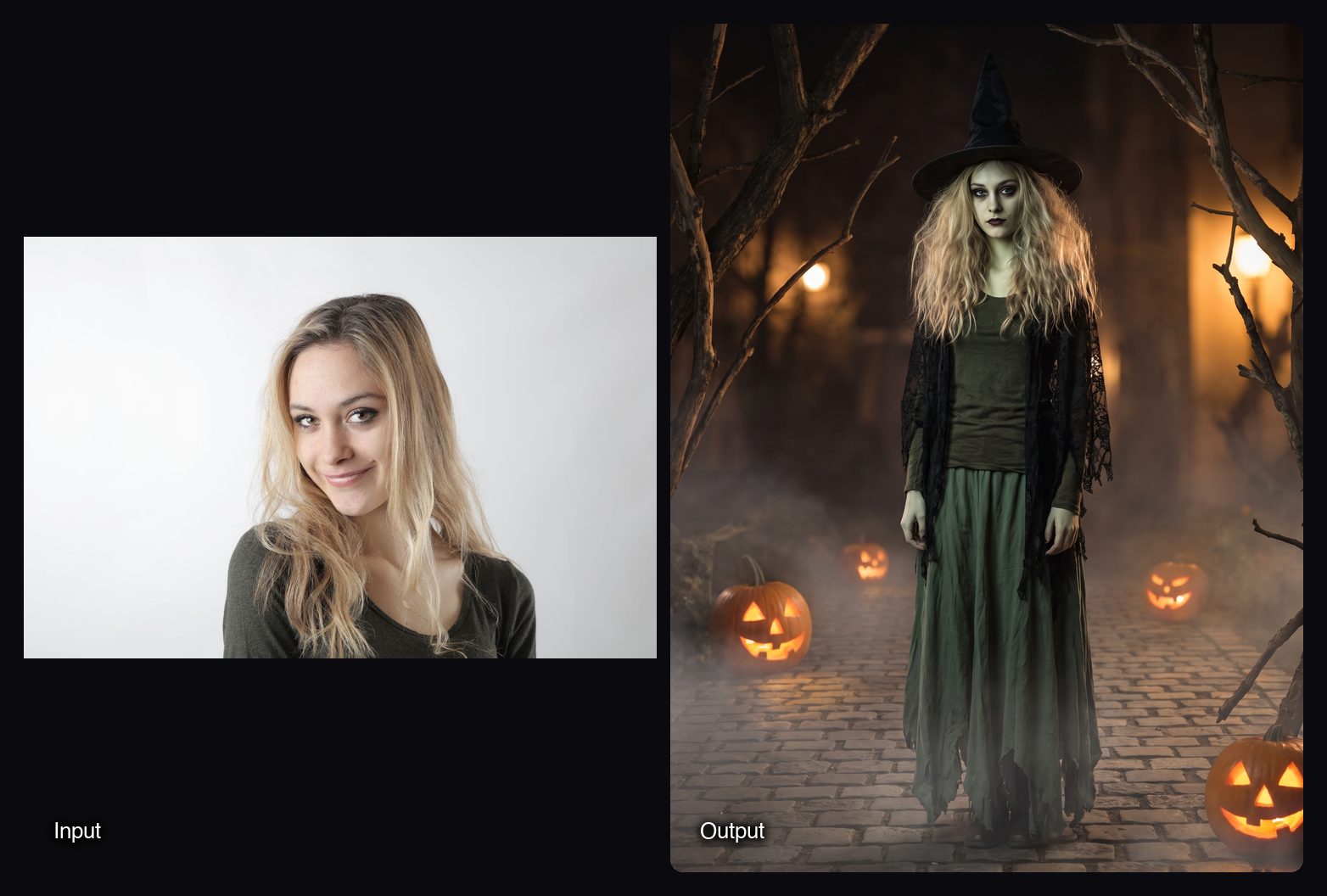
- Fright Fit: one photo in, four Halloween costume photos with a shopping and DIY guide out, for 2.16 credits a run.

Watch out for: Sloosh has no free plan. A first workspace gets 20 starter credits once, and then Creator at $19 a month for 195 credits is the cheapest plan. Sloosh has no public API or API keys yet; agents connect over MCP instead, which needs the Pro or Max plan. Nano Banana Pro does not offer 512px drafts, so draft on Nano Banana 2 or Nano Banana Lite and finish on Pro.
How to use Nano Banana Pro in Sloosh
Using Nano Banana Pro in Sloosh takes five steps.
- Sign in at sloosh.ai with a Sloosh account.
- Open Studio > Image and pick Nano Banana Pro in the model chip.
- Describe a finished photo: product, surface, light, then the text. Put each line of text in quotes and say where it sits.
- Add references with + and say what to keep from each, such as the label or the person's face.
- Set aspect ratio, resolution and count, then press Generate. The cost shows first, and results land in My generations and Assets.
Frequently asked questions
Can free users use Nano Banana Pro?
Not in the Gemini app. Google's plan table offers "Redo images with Nano Banana Pro" only on Google AI Plus, Pro and Ultra, and the Gemini API lists no free tier for it. Some third-party studios offer trial credits; Sloosh gives a first workspace 20 starter credits once.
Do I need Google billing to use the Nano Banana Pro API?
You need billing either way. Google's billing docs say the paid Gemini API tier, the only tier that runs Nano Banana Pro, means linking a billing account and prepaying at least $5. If you want no Google billing at all, use the Gemini app with a Google AI plan or a third-party studio.
How much does Nano Banana Pro cost per image?
Nano Banana Pro costs $0.134 per 1K or 2K image and $0.24 per 4K image in the Gemini API (Oct 23, 2026). fal charges $0.15 per image, doubled for 4K. Sloosh lists about 2.01 credits for a 2K image and 3.6 credits for 4K.
What is Nano Banana Pro best for?
Nano Banana Pro is best for finished work with text and a consistent brand look: campaigns, product photos and hero images. For quick drafts and large batches, Nano Banana 2 or Nano Banana 2.1 is faster and cheaper.
Can I use Nano Banana Pro images commercially?
It depends on the platform's terms. Google, fal and each studio publish their own terms of service, so check the terms of the route you use before you run images in paid ads.
Bottom line
If you already pay for a Google AI plan, the Gemini app is the simplest route to Nano Banana Pro. Developers who want no Cloud project can use the Gemini API's paid tier or fal. If you want Nano Banana Pro inside ready-made product, headshot and listing workflows with one account and one credit balance, use Sloosh.
Try Nano Banana Pro in Sloosh Studio