
What are the best AI tools to start a faceless channel?
What are the best AI tools to start a faceless channel?
Updated October 23, 2026 · By Emily Brooks
The best AI tools to start a faceless channel are a small stack, one per job: an AI chat assistant such as ChatGPT or Claude for scripts, ElevenLabs for the voice, Pictory or InVideo for long narrated videos, Descript for editing, and Sloosh for short explainer clips, where its Document to Cinematic Video Space turns a PDF or doc into a 20-second voiced, subtitled video for 35.48 credits (Sloosh, Oct 2026). Pick by the format you plan to post, not by the longest feature list.
Quick picks by job
- Scripts and ideas: ChatGPT or Claude, for hooks, outlines and first drafts.
- Voice-over: ElevenLabs, with speech in 90+ languages and a free plan of 10,000 credits a month.
- Long narrated videos from a script or article: Pictory, which gives every line of a script a scene, a visual, a voice and captions.
- Planning a video shot by shot: InVideo, which turns a script or idea into a shot-by-shot plan.
- Editing and captions: Descript, where you edit video by editing the transcript.
- Short faceless explainers for Shorts, Reels and TikTok: Sloosh's Document to Cinematic Video and AI Claymation and Wool Explainer Spaces.
What does a faceless channel need?
A faceless channel replaces the on-camera host with a voice, visuals and captions, so it needs a tool for each. The checklist below works with any stack.
- A repeatable format. Pick one: list videos, explainers, stories, history, finance or facts. A fixed format makes every step faster.
- A script that hooks in 3 seconds. Open with a question or a surprising fact, explain one idea, end with a payoff.
- One consistent voice. Use the same narrator voice in every video so viewers recognise the channel.
- Visuals that match each line. Stock footage, generated clips or a consistent animated character.
- Captions. Many viewers watch with the sound off.
- A thumbnail and a title. For long videos, these decide the click.
- Original value. YouTube's monetization policy makes mass-produced, generic or repetitive content ineligible, including AI content that gives the impression of mass production (YouTube Help, Oct 2026). Add your own research, angle or analysis to every video.
 [idea] -> [script] -> [voice] -> [visuals] -> [edit]
   |         |           |          |           |
   v         v           v          v           v
  chat     chat AI    ElevenLabs  Pictory,   Descript,
  AI                   or TTS     InVideo,   captions,
                                  Sloosh     music
                                     |
                                     v
                    [thumbnail] -> [publish]
The faceless channel pipeline: one tool per step, chosen by format.
How we compared
We read each vendor's own product page on October 23, 2026 and recorded what it states about inputs, outputs and free options. We did not run a channel on each tool. Where a vendor's page did not state a fact, the table says "Not stated".
AI tools for a faceless channel compared
| Tool | Job in the stack | What the vendor states | Free option | Checked on |
|---|---|---|---|---|
| ElevenLabs | Voice-over | Speech in 90+ languages, a voice library, voice cloning on paid plans | Free plan, 10,000 credits a month | Oct 23, 2026 |
| Pictory | Script, article or URL to video | Every script line gets a scene, visual, voice and captions; ElevenLabs voices | Free trial, 300 credits | Oct 23, 2026 |
| InVideo | Storyboard and script | Script or idea to a shot-by-shot plan; AI co-writer | Not stated (lowest tier is paid) | Oct 23, 2026 |
| Descript | Editing | Edit video by editing text; stock or cloned AI voices; one-click subtitles | Free plan | Oct 23, 2026 |
| Sloosh | Short explainer clips | Document to a 20 s voiced, subtitled video; 10 s clay, wool or Pixar-style explainers | 20 starter credits once | Oct 23, 2026 |
Scripts: ChatGPT or Claude
A general AI assistant is the usual first tool. Use it to brainstorm topics, outline a video and draft a script, then rewrite the draft in your own words and fact-check every claim.
- Best for: ideas, outlines and first drafts.
- Watch out for: made-up facts and generic phrasing. Faceless channels in facts, history or finance live or die on accuracy.
Voice: ElevenLabs
ElevenLabs generates speech in 90+ languages and accents from a searchable voice library. Instant voice cloning needs about one to two minutes of your recording and is available on Starter plans and above (ElevenLabs, Oct 2026).
- Best for: a consistent narrator voice, in one language or several.
- Watch out for: the free plan's 10,000 credits are roughly 10 minutes of audio a month, per ElevenLabs.
Long narrated videos: Pictory and InVideo
Pictory turns scripts, articles, blog posts and URLs into videos, giving every line of a script a scene, a visual, a voice and captions. Its voices are by ElevenLabs. InVideo lets you write a script with an AI co-writer and turn a script or idea into a shot-by-shot plan before generating.
- Best for: list and explainer videos of several minutes built on stock visuals.
- Watch out for: stock-footage videos can look like every other channel. Add original visuals where you can.
Editing: Descript
Descript edits video by editing the transcript: delete a word and that moment is cut. It has stock and cloned AI voices and adds subtitles in one click.
- Best for: tightening narration, fixing mistakes and adding captions.
Short faceless explainers: Sloosh
Sloosh is an AI video and image studio for creators, filmmakers and brand teams. It suits the short end of a faceless channel: Shorts, Reels and TikTok explainers.
- Document to Cinematic Video: upload a PDF, Word file, PowerPoint deck, Markdown or plain text, and pick a style (Cinematic film, 3D motion graphics, Paper cut-out, Claymation or Futuristic hologram). You get a 20-second video with voice-over narration, visual metaphors and burned-in subtitles, for 35.48 credits a run.
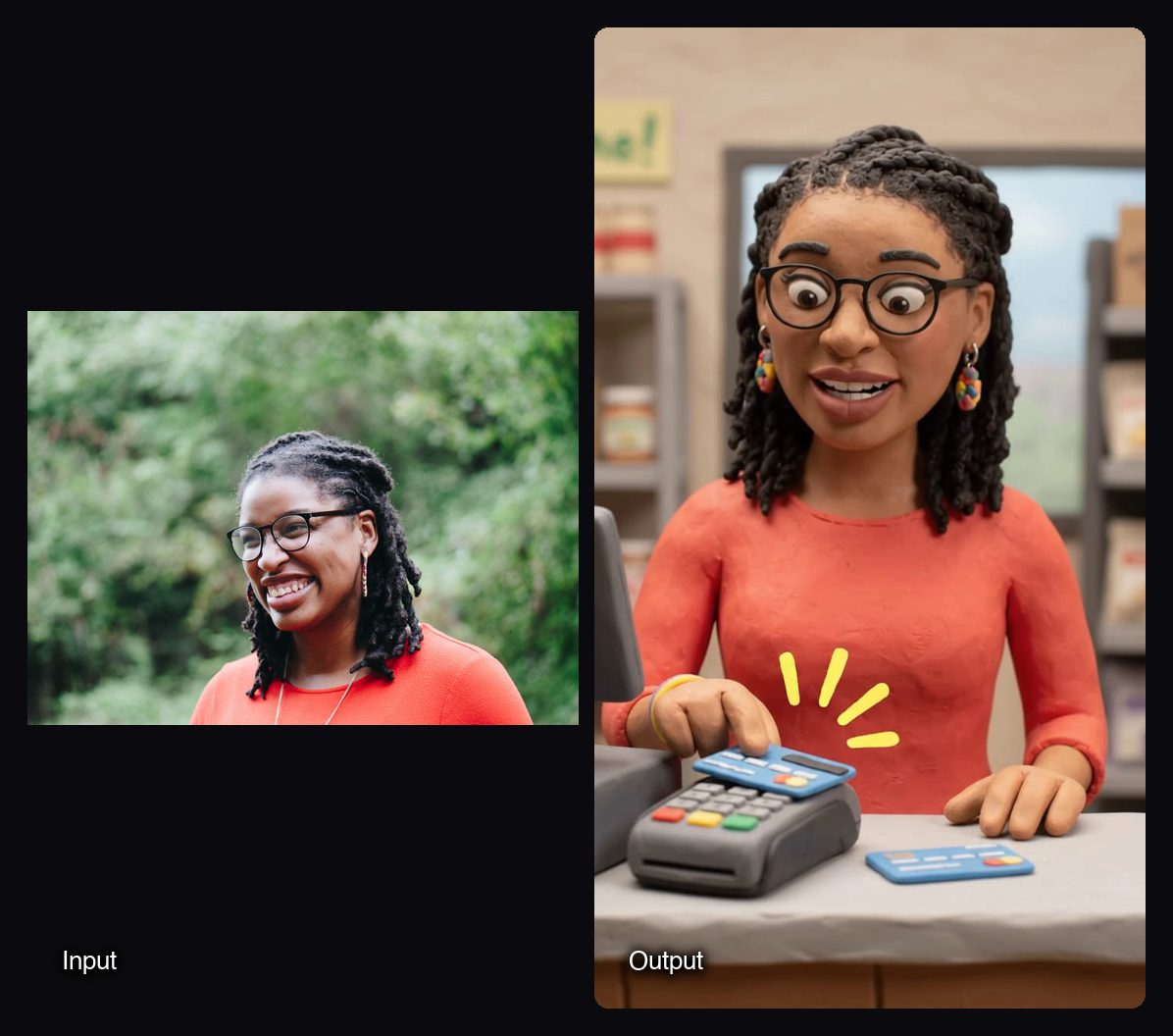
- AI Claymation and Wool Explainer Videos: upload one photo, type a topic and pick Clay, Wool or Pixar. You get a 10-second vertical video (9:16, 720p) of a stylised character speaking three timed beats, for 15.27 credits a run. Use a mascot-style portrait you have rights to if you want to stay off camera.
- Finishing: Add Captions burns auto-generated subtitles into a talking video (15 credits), and Add a Soundtrack composes an instrumental track to fit your clip (0.96 credits).
- B-roll: in Sloosh Studio, Seedance 2.5 and Wan 3 make the longest clips, up to 30 seconds.
Watch out for: Sloosh makes short clips, not 10-minute videos. The longest single clip is 30 seconds, so longer videos must be joined, for example with Spacelab's Video Concat node. Studio has no timeline editor, and Sloosh does not publish to YouTube or social accounts. There is no free plan; a new workspace gets 20 starter credits once.
How to make a faceless explainer Short in Sloosh
- Write the core message. Put one clear idea and its key takeaways in a short doc or PDF.
- Open Document to Cinematic Video. Go to sloosh.ai/spaces/document-to-cinematic-video and sign in.
- Upload the document and pick a style. Match the style to your channel, for example 3D motion graphics for tech or Paper cut-out for history.
- Press Generate. The button shows the cost, 35.48 credits, before you spend anything.
- Download and post. The video arrives with voice-over and subtitles. Keep the same style across videos so the channel is recognisable, but give each one a distinct topic and angle.
Frequently asked questions
Can you start a faceless channel with only AI tools?
Yes. AI tools can cover scripting, voice, visuals, captions and thumbnails. You still need to choose topics, check facts and add your own angle, because YouTube does not monetize mass-produced or repetitive content.
What is the cheapest way to start a faceless channel?
Start on free plans and trials. ElevenLabs has a free plan of 10,000 credits a month, Descript has a free plan, and Pictory offers a free trial of 300 credits. Sloosh has no free plan but gives a new workspace 20 starter credits once.
Can AI make long faceless YouTube videos?
Yes, with script-to-video tools such as Pictory, which build a video scene by scene from a script, article or URL. Sloosh is better suited to short clips: its explainer Spaces make 10- and 20-second videos.
Do faceless channels need a voice-over?
Most do. A narrator voice carries the story when there is no host. ElevenLabs, Descript and Pictory all offer AI voices, and Sloosh's explainer Spaces include a voice in every clip.
What kind of faceless content works best with AI?
Formats with a clear script and simple visuals work best: explainers, list videos, facts, history and short educational clips. Formats that depend on personality or live reactions are harder to make without a person on camera.
Bottom line
Build a faceless channel from one tool per job: an AI assistant for scripts, ElevenLabs for the voice, Pictory or InVideo for long narrated videos, and Descript for editing. If your channel is short-form explainers, Sloosh turns a document or a topic into a finished, voiced clip in one form.
Turn a document into a faceless explainer in Sloosh