What is the best AI YouTube thumbnail maker?
What is the best AI YouTube thumbnail maker?
Updated October 23, 2026 · By Emily Brooks
The best AI YouTube thumbnail maker depends on the job: Pikzels if you want a dedicated thumbnail tool with recreate and scoring features, Adobe Express if you want templates and a free plan, ThumbMagic if you want options generated from your video or script, and Sloosh if you want your face and a short title turned into a finished 16:9 thumbnail for 0.97 credits a run (Sloosh, Oct 2026). None of them can promise more clicks, so test the result on YouTube itself.
Quick picks by use case
- Copy the format of a thumbnail that already works: Pikzels, which recreates a thumbnail's format from a pasted YouTube link.
- Template-first design with a free plan: Adobe Express, which offers free templates and generative AI tools.
- Thumbnail options generated from your video: ThumbMagic, which takes a YouTube URL, a transcript or an uploaded video.
- Your face plus a short headline, one form, under a credit: Sloosh's YouTube Thumbnail Maker Space.
- Text-heavy thumbnails you want to prompt yourself: Ideogram 4.5 or GPT-image-2 in Sloosh Studio.
- Picking the winner: YouTube Studio's own A/B test, which compares up to 3 titles and thumbnails.
What makes a YouTube thumbnail get clicked?
A thumbnail that gets clicked shows one clear subject, a readable short headline and strong contrast at small sizes. The checklist below works with any tool.
- Size it for YouTube. YouTube asks for a 16:9 image for videos, at least 640 pixels wide, as JPG or PNG. It recommends 3840 x 2160 pixels (YouTube Help, Oct 2026).
- One face, one emotion. A close face with a clear expression reads on a phone screen. Several small faces do not.
- Two to five words. The headline should add to the title, not repeat it. Short text is also easier for AI to spell.
- High contrast. Thumbnails are viewed small, next to dozens of others. Bold colours and a clean background separate the subject.
- Match the video. A thumbnail that promises something the video does not deliver can cost watch time.
- Test, then keep the winner. YouTube Studio's A/B test shows the option with the highest watch time to all viewers once a winner is clear (YouTube Help, Oct 2026).
How we compared
We read each vendor's own product page on October 23, 2026 and recorded what it states about inputs, face handling, scoring and pricing. We did not run click-through tests, and no vendor's CTR claim is repeated here, because none of them link to a method. Canva blocked our fetch, so it is not in the table.
 [your photo] + [2-5 word title]
          |
          v
 +-------------------+     +-------------------+
 | AI thumbnail tool |---->| 16:9 thumbnail    |
 +-------------------+     +-------------------+
          ^                          |
          |                          v
  edit text / colour      [YouTube Studio A/B test]
                                     |
                                     v
                          keep the highest watch time
A thumbnail workflow: generate from a photo and a short title, then let YouTube's test pick the winner.
Pikzels
Pikzels is a dedicated AI thumbnail tool. Its "Recreate" feature takes a pasted YouTube link and recreates that thumbnail's format so you can iterate on it. Its "Persona" feature puts your face in every thumbnail after you upload 3 photos once. "Pikzels Score" rates a thumbnail and title on virality, clarity, idea, curiosity and emotion.
- Best for: creators who publish often and want to adapt proven thumbnail layouts.
- Watch out for: the pricing page lists annual plans (Premium at $28 a month billed annually at $336, Oct 2026). The score is Pikzels' own rating, not your channel's results.
Adobe Express
Adobe Express offers thousands of thumbnail templates and says you can make YouTube thumbnails for free. Its AI tools generate images from a description and add or remove objects.
- Best for: people who want to start from a template and edit text and layout by hand.
- Watch out for: the thumbnail page does not say which generative AI tools are included in the free plan.
ThumbMagic
ThumbMagic generates YouTube and Shorts thumbnail options from a YouTube URL, a transcript file or an uploaded video. It lists a text generator, a thumbnail editor, video to thumbnail and an expression changer, and says it exports in 4K.
- Best for: creators who want options suggested from the video content itself.
- Watch out for: the home page shows no prices. Check its pricing page before you commit.
Sloosh: YouTube Thumbnail Maker
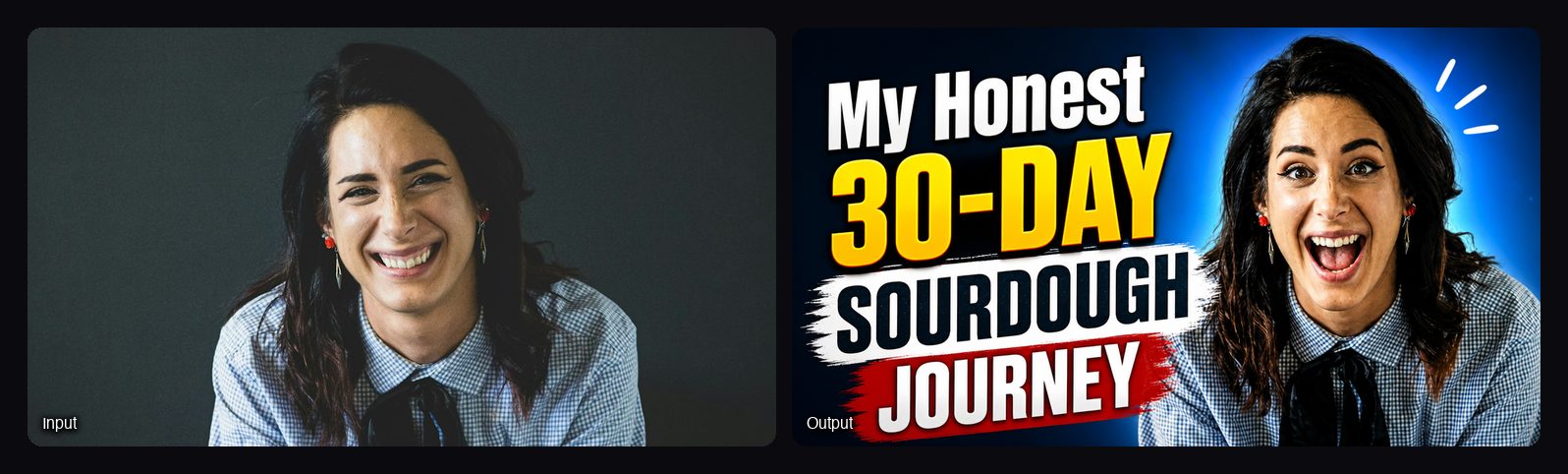
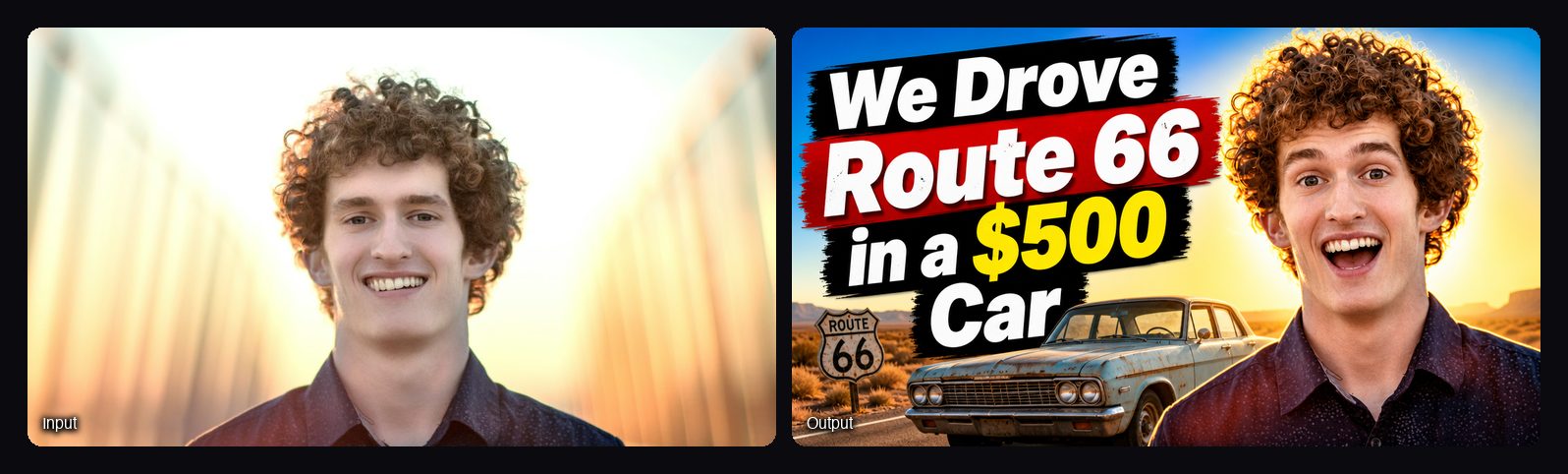
Sloosh is an AI video and image studio for creators, filmmakers and brand teams. Its YouTube Thumbnail Maker Space takes two inputs, your photo and your video title, and returns a bold, high-contrast 16:9 thumbnail with your face and headline (Sloosh, Oct 2026). One run costs 0.97 credits, and you can use the result on your channel.
- Best for: creators who want a finished thumbnail from one photo and a short title, with no design work.
- Also useful: Poster Redesign with Your Character recreates a poster you like with you as the star, for 2.01 credits. It returns a 4:5 image with no text, so it suits key art more than a final thumbnail.
- Watch out for: titles of two to five words spell reliably; longer titles may not. Sloosh does not score thumbnails, test click-through rate or upload to YouTube. A new workspace gets 20 starter credits once, and there is no free plan.
AI YouTube thumbnail makers compared
| Tool | Inputs | Face handling | Scoring or testing | Price shown on vendor site | Checked on |
|---|---|---|---|---|---|
| Pikzels | Prompt, or a YouTube link to recreate | Persona from 3 photos | Pikzels Score | From $28 a month, billed annually | Oct 23, 2026 |
| Adobe Express | Template or blank canvas, text prompt | Not stated | Not stated | Free plan with core features | Oct 23, 2026 |
| ThumbMagic | YouTube URL, transcript or video | Upload your face | Not stated | Not shown on home page | Oct 23, 2026 |
| Sloosh YouTube Thumbnail Maker | Your photo and video title | Your uploaded photo | None | 0.97 credits a run | Oct 23, 2026 |
| YouTube Studio | Thumbnails you made | Not applicable | A/B test of up to 3 titles and thumbnails | Free | Oct 23, 2026 |
Text-heavy thumbnails in Sloosh Studio
For a thumbnail you want to design by prompt, two image models in Sloosh Studio handle text well. Ideogram 4.5 is Ideogram's typography model, released on 30 September 2026, and offers a 16:9 aspect ratio and up to 5 images per prompt in Sloosh. GPT-image-2 is OpenAI's model for designed layouts with several blocks of text, with up to 16 reference images. Put every word that must appear in double quotes, and keep the headline short.
How to make a YouTube thumbnail in Sloosh
- Open the Space. Go to sloosh.ai/spaces/youtube-thumbnail-maker and sign in.
- Upload your photo. Use a clear, well-lit photo of your face. Only upload people you have the rights to use.
- Type the title. Keep it to two to five words, for example "I Baked For 30 Days".
- Press Generate. The button shows the cost, 0.97 credits, before you spend anything.
- Download and test. The result appears in the Generations tab. Upload two or three versions to YouTube Studio's A/B test and keep the winner.
To start faster, open a result on the Space's templates page, press Recreate and swap in your own photo and title.
Frequently asked questions
Can I make YouTube thumbnails with AI?
Yes. AI thumbnail makers turn a photo, a prompt or your video into a finished image. Sloosh's YouTube Thumbnail Maker needs only your photo and a short title, and returns a 16:9 thumbnail for 0.97 credits a run.
What size should a YouTube thumbnail be?
A YouTube thumbnail should be 16:9, at least 640 pixels wide, in JPG or PNG. YouTube recommends 3840 x 2160 pixels and accepts up to 50 MB from a desktop or 2 MB from mobile (YouTube Help, Oct 2026).
Do AI thumbnails get more clicks?
Not by themselves. No vendor in this comparison links to a method behind its CTR claims. The reliable way to find out is YouTube Studio's A/B test, which compares up to 3 titles and thumbnails and keeps the one with the highest watch time.
How long should the text on a thumbnail be?
Two to five words is a safe length. Short text reads at small sizes, and AI image models spell it more reliably. Sloosh's YouTube Thumbnail Maker states that two to five words spell reliably.
Can I use an AI thumbnail on a monetised channel?
Yes, as long as you have the rights to the photos you upload and the thumbnail represents the video honestly. The Sloosh Space page says you can use what you create on your channel, in ads and in social posts.
Do I need a verified account to upload a custom thumbnail?
Yes. YouTube lets you upload your own thumbnail only if your account is verified, and the same applies to Shorts thumbnails (YouTube Help, Oct 2026).
Bottom line
Pick the tool by the job you have. Pikzels suits frequent uploaders who want recreate and scoring features, Adobe Express suits template editing, and ThumbMagic works from your video. For a finished thumbnail from one photo and a short title, Sloosh's Space does it in one step for under a credit. Whatever you use, let YouTube's A/B test choose the winner.
Make a YouTube thumbnail in Sloosh