How do I make ghost mannequin photos with AI?
How do I make ghost mannequin photos with AI?
Updated October 23, 2026 · By Lauren Hayes
To make ghost mannequin photos with AI, upload a clear photo of the garment to a ghost mannequin tool and let it rebuild the piece as a hollow, worn 3D shape on a clean background. Photoroom and Snaproom start from flat-lay or hanging shots, GhostFit is built for resale and boutique sellers, and Sloosh's Ghost Mannequin Space turns an on-model photo into one 4:5 ghost mannequin image on white for 2.01 credits a run (Sloosh, Oct 2026). Photoshop remains the manual route if you shoot on a real mannequin.
A ghost mannequin (also called invisible mannequin or hollow-man) photo shows a garment as if worn, with the body removed. It shows fit, neckline and sleeve shape without a model pulling attention from the product.
What does a good ghost mannequin photo need?
A good ghost mannequin photo keeps the garment's true shape and detail and removes every trace of the body or stand. This checklist applies to any tool, AI or manual.
- A clear source photo. Even light, the whole garment in frame, no hands, hair or bags covering the front.
- One garment per photo. AI tools pick the most obvious piece. Crop out a jacket if you want the shirt under it.
- A visible inner neckline. The back of the collar or the inside label is what makes the shot look hollow rather than flat.
- True colour and fabric. Check the result against the real garment, especially prints, stitching, pockets and logos.
- Natural volume. Sleeves and body should look filled, symmetrical and gently draped, not inflated.
- A plain white or light grey background, at the ratio your store uses (4:5 and 1:1 are common for fashion grids).
How to make a ghost mannequin photo in Sloosh
The Ghost Mannequin Space in Sloosh needs one input, an on-model photo, and returns one ghost mannequin image. It is listed as made for Shopify and Amazon listings.
[ on-model photo ]
        |
        v
[ Ghost Mannequin Space ]  -- 2.01 credits a run
        |
        +--> picks the most prominent garment
        +--> removes the person, keeps shape
        v
[ one 4:5 image on white ]
        |
        v
[ check details ] --> [ store / marketplace ]
How Sloosh's Ghost Mannequin Space turns one on-model photo into a listing image.
- Open the Space. Go to sloosh.ai/spaces/ghost-mannequin and sign in.
- Crop your photo to one garment. The Space extracts the most prominent piece, usually the top or jacket.
- Upload the on-model photo. This is the only required field.
- Press Generate. The button shows the cost first: 2.01 credits a run (Oct 2026).
- Download the result from the Space's Generations tab. You get one 4:5 ghost mannequin image on white. Share copies a public
sloo.sh/r/link if you want a reviewer to see it. - Shortcut: open a run on the templates page, press Recreate to load its inputs, then swap in your photo.
The Space prompt locks colour, fabric, pockets and stitching, according to the Space's own page. Sloosh's terms on that page say you can use what you create in your ads, store and social posts, as long as you have the rights to the photos you upload.
If you only want the garment cut out of a photo rather than a full invisible-mannequin render, the Garment Extractor Space takes one image and costs 1.01 credits a run.
Watch out for: the Ghost Mannequin Space starts from a photo of someone wearing the garment, not a flat lay, and it returns one 4:5 image per run, so a front-and-back set is two runs. A new workspace gets 20 starter credits once, enough for several test runs; after that you need a plan (Creator is $19 a month for 195 credits, per Sloosh pricing).
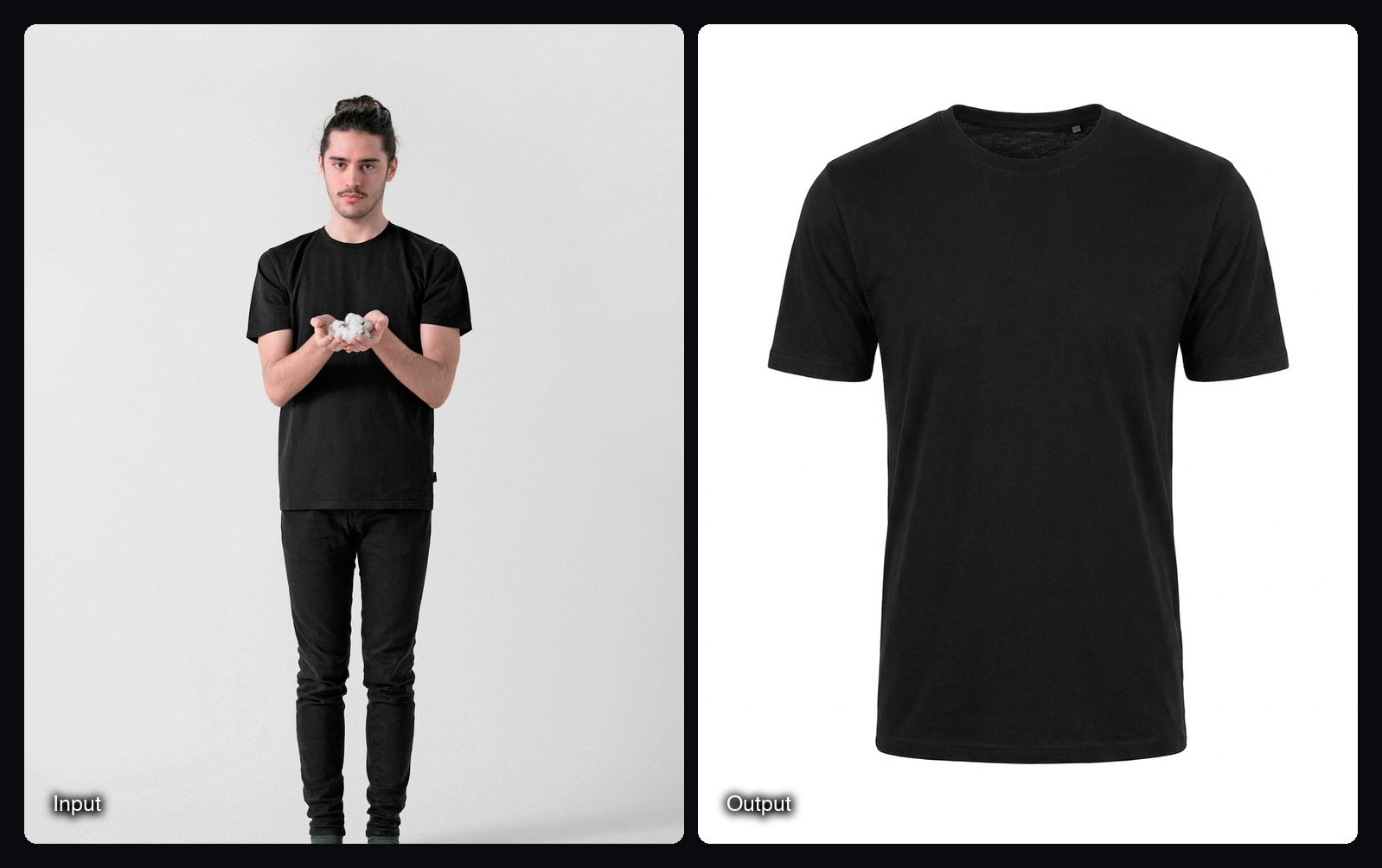
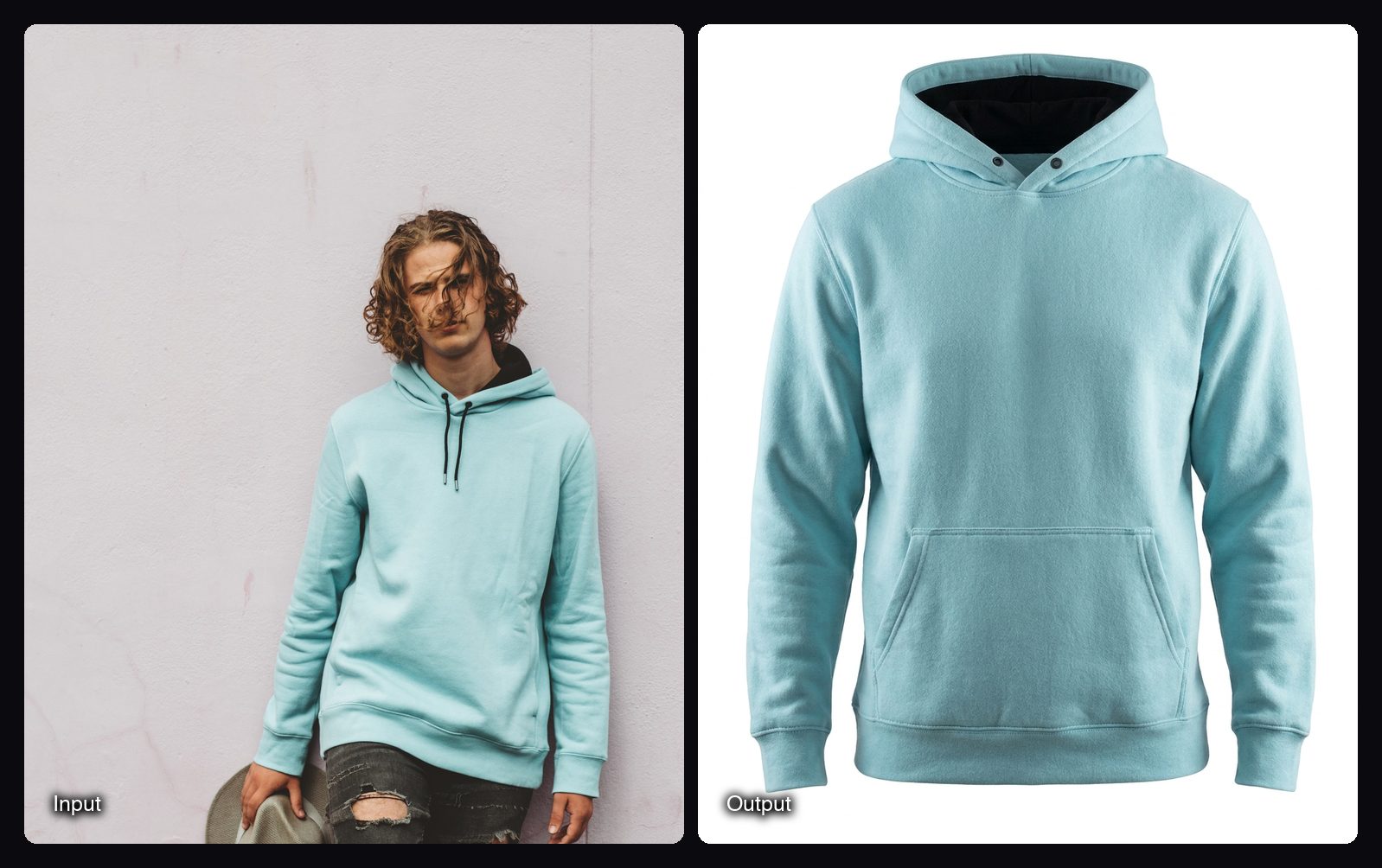
What the Ghost Mannequin Space produces
These are template runs from the Space's gallery, made with Nano Banana Pro. Each can be recreated with your own photo.
Other ways to make ghost mannequin photos with AI
The right tool depends on what photo you already have. If you have a flat lay or a hanger shot, a tool that starts from those saves a reshoot. If you already have on-model photos, Sloosh's Space reuses them.
| Tool | Starts from | Best for | Checked on |
|---|---|---|---|
| Sloosh Ghost Mannequin | An on-model photo | Reusing model shots as clean 4:5 listing images; 2.01 credits a run | Oct 23, 2026 |
| Photoroom | Flat lay, hanging, mannequin or model photo | Catalogue teams that also need background removal and batch edits | Oct 23, 2026 |
| Snaproom | Flat garment photos | Clothing sellers who want ghost mannequin plus try-on, angles and short video in one plan | Oct 23, 2026 |
| GhostFit | Flat lay, hanging, floor or bed photos | Resale and boutique sellers on Vinted, Depop, eBay and Etsy | Oct 23, 2026 |
| Adobe Photoshop | Your own mannequin shots | Full manual control over the composite | Oct 23, 2026 |
- Photoroom says its ghost mannequin tool accepts a flat lay, hanging garment, mannequin or model image and rebuilds hidden parts of the garment. Photoroom also offers batch processing for whole catalogues.
- Snaproom lists ghost mannequin as one of 8 tools in every plan, alongside flat-lay to model, multi-angle sets and 5-second videos. Its homepage says new accounts get 100 free credits.
- GhostFit describes itself as turning flat lay, hanging, floor or bed photos into ghost mannequin images, aimed at Shopify, Vinted, Depop, eBay, Etsy and boutique brands.
Plans and credit costs change often, so check each vendor's pricing page before you commit.
The manual route. The traditional method is to shoot the garment on a mannequin, then shoot the inside back of the neck and the inner label separately. In Photoshop you mask out the mannequin, place the inner neck shot behind the collar, and clean up the edges. It gives the most control and takes the most time per SKU, which is why most stores with large catalogues now use AI for the bulk of it.
Tips for better AI ghost mannequin results
- Shoot straight on. A square-on front view gives the AI a symmetrical shape to work from. Angled poses lead to twisted sleeves.
- Avoid crossed arms and hands in pockets. Anything covering the garment has to be invented, and invented areas are where errors appear.
- Keep layers simple. Unzip or remove an outer layer you do not want, or crop it out before upload.
- Check the back of the collar. If the neckline looks solid, rerun or try a photo where the inside of the collar shows.
- Keep one style across the catalogue. Run every SKU through the same tool so lighting, shadow and crop match on the grid.
Frequently asked questions
Can I turn any photo into a ghost mannequin image?
Mostly yes, if the garment is clearly visible and not covered. Tools differ in the input they expect: Photoroom accepts flat lays, hanging shots, mannequins and model photos, while Sloosh's Ghost Mannequin Space starts from a photo of someone wearing the garment.
Which app is best for creating ghost mannequins?
It depends on your source photo. Photoroom, Snaproom and GhostFit suit flat lay and hanger shots, and Sloosh's Ghost Mannequin Space suits stores that already have on-model photos and want a 4:5 image on white for 2.01 credits a run (Oct 2026).
How much does an AI ghost mannequin photo cost?
In Sloosh, one Ghost Mannequin run costs 2.01 credits (Oct 2026). On the Creator plan, $19 buys 195 credits a month, which is under $0.20 a run at that rate. Other tools price by plan or credits, so check their pricing pages.
Does AI keep the garment's colour and details accurate?
Usually, but check every image. Sloosh's Ghost Mannequin Space locks colour, fabric, pockets and stitching in its prompt, but any AI tool can still soften small prints or logos, so compare the result with the real garment before you list it.
Can I use AI ghost mannequin photos on Amazon or Shopify?
Yes, AI-made ghost mannequin images can be used on store and marketplace listings, as long as they show the real product accurately. Sloosh lists its Ghost Mannequin Space as made for Shopify and Amazon. Check each marketplace's image rules, such as background colour, before you upload.
What if my photo shows more than one garment?
Crop the photo to the piece you want first. Sloosh's Ghost Mannequin Space extracts the most prominent garment, usually the top or jacket, so a shirt under an open jacket needs its own cropped photo.
Bottom line
To make ghost mannequin photos with AI, pick the tool that matches the photo you already have. Photoroom, Snaproom and GhostFit work from flat lays and hanger shots, Photoshop gives full manual control, and Sloosh turns on-model photos into 4:5 ghost mannequin images on white in one run.
Make a ghost mannequin photo in Sloosh