How do I create jewellery-on-model photos with AI?
How do I create jewellery-on-model photos with AI?
Updated October 23, 2026 · By Lauren Hayes
To create jewellery-on-model photos with AI, upload a sharp packshot of the real piece and a photo of a model, let the tool place the jewellery at the right scale, then check the metal, stones and size against the original. Sloosh's Jewellery on Model Space does this in one run and returns a 4:5 close-up portrait for 2.01 credits (Sloosh, Oct 2026). Jewellery-specific apps such as Gemzy and fashion suites such as The New Black and Flair do the same job with their own libraries of AI models.
What a jewellery-on-model photo has to get right
Jewellery is harder for AI than clothing because the pieces are small, reflective and judged up close. A good on-model shot passes these checks.
- Metal finish. Yellow gold, rose gold, silver and platinum must stay their own colour. AI often warms or cools metal to match the scene.
- Stone colour and cut. A pale aquamarine should not turn blue topaz. Count the stones and check their shape.
- Scale. A 10mm stud must not become a statement earring. Compare the piece with the ear, finger or collarbone.
- Placement and physics. Earrings hang from the lobe, necklaces sit on the collarbone and follow gravity, and rings sit on one finger.
- Clasps, chains and settings. Fine detail such as prongs and chain links is where AI simplifies first.
- Reflections. Highlights on the metal should match the light on the model's skin.
[jewellery packshot] --+
                       +--> [place + scale]
[model photo] ---------+          |
                                  v
                          [4:5 portrait]
                                  |
                                  v
              [check: metal, stones, scale, clasp]
                                  |
                   pass: publish / fail: rerun
The workflow: two photos in, one on-model portrait out, then a fidelity check before you publish.
How to create jewellery-on-model photos in Sloosh
Sloosh is an AI video and image studio for creators, filmmakers and brand teams. Its Jewellery on Model Space puts your piece on a model in one run.
- Open the Space. Go to sloosh.ai/spaces/jewellery-on-model and sign in.
- Upload a model photo. Use a photo of a person you have the rights to use, with the ear, neck, hand or wrist visible for the piece you sell.
- Upload a jewellery photo. Use a sharp packshot on a plain background. The Space's FAQ lists earrings, necklaces, rings and bracelets.
- Press Generate. The button shows the cost first: 2.01 credits a run (Oct 2026).
- Download the portrait. You get one 4:5 close-up portrait of the model wearing the piece, with reflections on the metal, in the Space's Generations tab.
- Or recreate a template. Open one on the template gallery, press Recreate and swap in your photos.
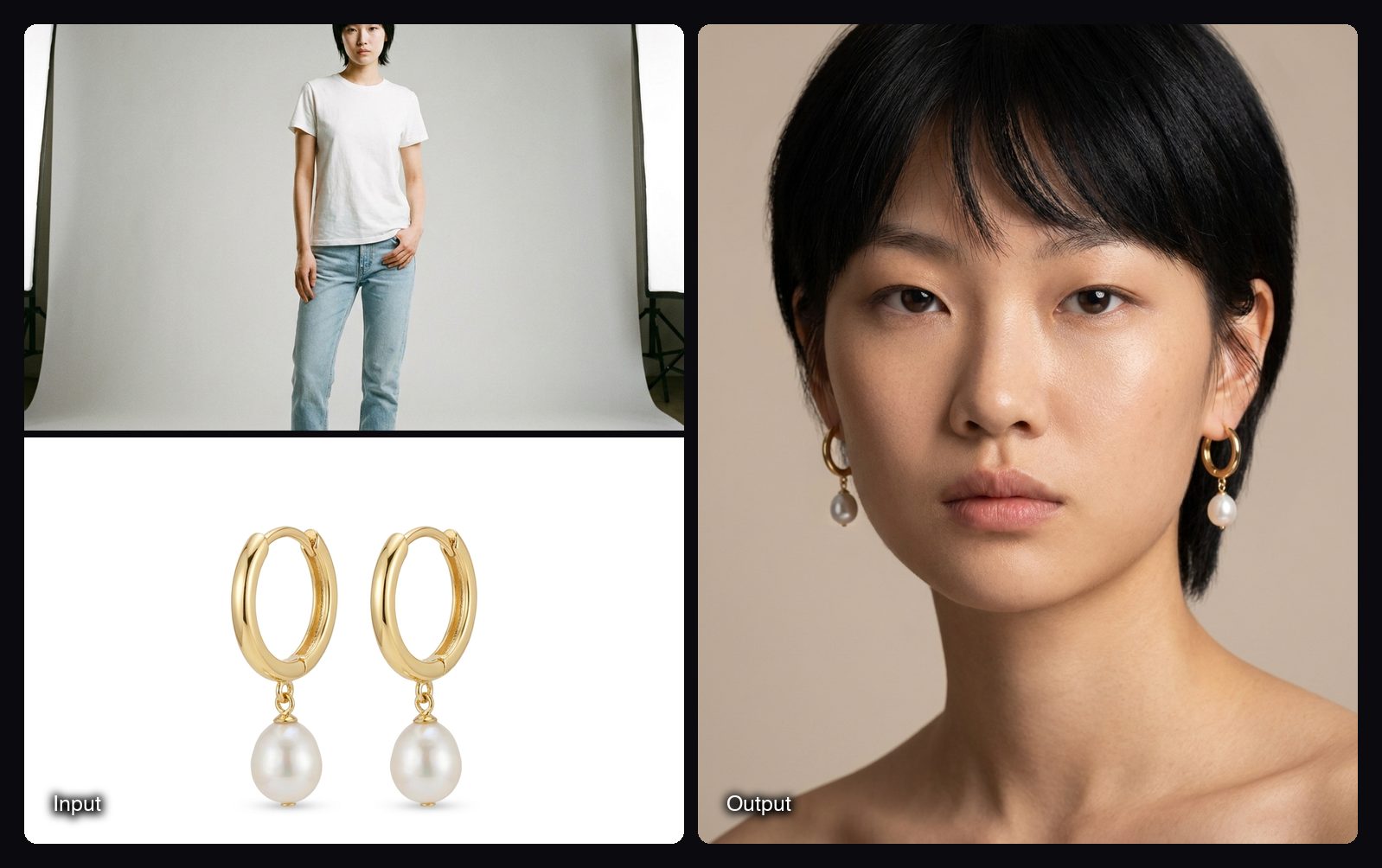
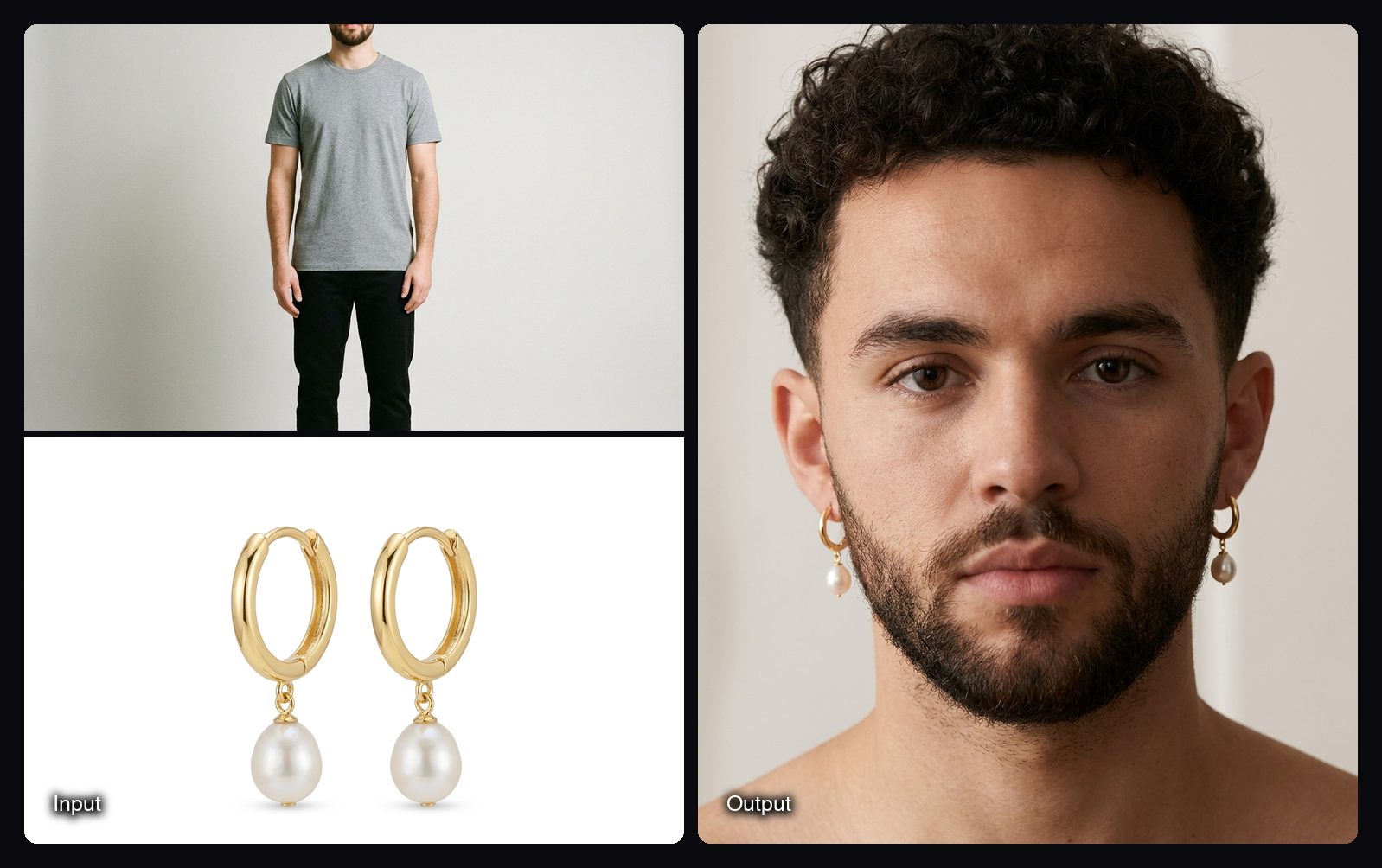
The Space page lists it as made for Shopify, Instagram and Meta Ads, and says you can use the images in your ads, store and social posts. For eyewear, the Glasses Try-On Space fits frames onto a face at the right scale with lens reflections, returning one 4:5 photo for 2.01 credits.
Watch out for: each run makes one 4:5 close-up, so a full set (ear, neck and hand shots, or several models) takes several runs. You bring the model photo; the Space does not offer a built-in model library. Check metal finish and stone colour against the real piece on every image, since no AI tool guarantees an exact match. A new workspace gets 20 starter credits once, enough for several 2.01-credit runs.
Checking an AI jewellery photo before you publish
Put the AI image next to your packshot at the same zoom and go through this list. It takes about a minute per image.
- Colour. Sample the metal in both images. If gold looks brassy or silver looks grey, rerun with a better-lit packshot.
- Size. Measure the piece against the model. Note the real size in the listing, such as drop length or stone diameter.
- Count. Count the stones, links and charms. AI sometimes adds or merges them.
- Fit. Check that the earring post goes into the lobe and the ring sits on a finger, not across two.
- Label honestly. If an image is AI-made, keep a real photo of the piece in the listing too, so buyers can see the true item.
Other AI tools for jewellery on a model
These tools were checked on their own sites. Prices change, so the table describes how each one works.
| Tool | Best for | How it works | Checked on |
|---|---|---|---|
| Sloosh Jewellery on Model | Putting a piece on your own model photo | Upload a model photo and a packshot; one 4:5 close-up; 2.01 credits a run | Oct 23, 2026 |
| Gemzy | Jewellery brands that want a prompt-free mobile app | Upload a photo, pick from 15+ AI models and ready-made Looks; iOS and Android; says under 60 seconds | Oct 23, 2026 |
| The New Black | Fashion brands that want jewellery inside a wider fashion suite | "Product to model" and "Try on products" workflows, bulk generation, Shopify connection | Oct 23, 2026 |
| Flair | Teams that art-direct on a canvas | Fashion photoshoots that fit clothing and jewellery onto AI models; AI human builder | Oct 23, 2026 |
| Pebblely | Quick template shots | Templates include necklaces worn around a model's neck | Oct 23, 2026 |
Manual route. Book a model and a macro lens, or composite a packshot onto a stock model photo in Photoshop. You get exact colour, and it costs the most time per image.
Frequently asked questions
Can AI put my real jewellery on a model?
Yes. Tools such as Sloosh's Jewellery on Model, Gemzy and The New Black take a photo of your actual piece and place it on a model. Use a sharp packshot on a plain background, and check the metal and stones on every result.
What photo of my jewellery works best for AI?
A sharp packshot on a plain background works best. Light it evenly so the metal colour is true, and shoot the piece from the angle it will be worn, such as an earring from the front.
Which jewellery works with AI on-model tools?
Earrings, necklaces, rings and bracelets all work in Sloosh's Jewellery on Model Space. Very fine chains and tiny pavé stones are the hardest for any AI tool, so check those closely.
How much does an AI jewellery-on-model photo cost?
In Sloosh, one Jewellery on Model run costs 2.01 credits (Oct 2026). On the Creator plan ($19 for 195 credits a month), that is about $0.20 per image. Other tools use their own plans or credits.
Can I use AI jewellery photos commercially?
Yes, in Sloosh you can use what you create in your ads, store and social posts, as long as you have the rights to the model and product photos you upload. Keep a real photo of the piece in your listing as well.
Bottom line
To make jewellery-on-model photos with AI, start from a sharp packshot, place it on a model, and check metal, stones and scale before you publish. Sloosh's Jewellery on Model does it from your own model photo for 2.01 credits a run; Gemzy suits brands that want a mobile app with ready-made AI models.
Put your jewellery on a model in Sloosh