Which platform gives the best access to Gemini Omni 1.1 Flash?
Which platform gives the best access to Gemini Omni 1.1 Flash?
Updated October 23, 2026 · By Jason Miller
Google AI Studio and the Gemini API give developers the most direct access to Gemini Omni 1.1 Flash, Google Flow is Google's own no-code route for Google AI Plus, Pro and Ultra subscribers, and Sloosh is the route for people who want the model inside ready-made video workflows: it runs Gemini Omni 1.1 Flash in Studio, in Spacelab and in Spaces such as AI Claymation and Wool Explainer Videos, which makes a 10-second vertical video for 15.27 credits a run (Sloosh, Oct 2026).
Which one is "best" comes down to two questions: do you write code, and do you already pay Google for an AI plan?
Gemini Omni 1.1 Flash at a glance
Gemini Omni 1.1 Flash is Google's current Omni video model. Google released it as generally available on August 27, 2026. These specs come from Google's Gemini API docs and launch post (checked October 23, 2026).
- Model id:
gemini-omni-1.1-flashin the Gemini API;gemini-omni-1.1-flash-previewon Vertex AI, where it is still in Preview. - Clip length: up to 10 seconds per generation, extendable in 10-second steps to 40 seconds in total.
- Resolution: 360p, 720p (default), and 1080p or 4K, which Google produces by upscaling.
- Aspect ratios: 16:9 or 9:16 only.
- Sound: every clip has audio. Audio references are not supported.
- Inputs: text, first and last frames, image references, and a video of 10 seconds or less to edit or extend.
Google says a 360p draft is up to 60% faster than 720p, at a third of the cost. Editing or extending an uploaded video is not available in the EEA, Switzerland or the UK.
Access routes compared
Gemini Omni 1.1 Flash reaches users through four Google surfaces and a few third-party studios. The table lists what each platform's own pages say.
| Platform | Who it suits | Access | What it needs | Price (as published) | Checked on |
|---|---|---|---|---|---|
| Gemini API / Google AI Studio | Developers | API and AI Studio playground | Paid API tier: a linked billing account and at least $5 prepaid | About $0.10 per second of 720p video; no free tier | Oct 23, 2026 |
| Vertex AI (Agent Platform) | Enterprises on Google Cloud | API, Preview | A Google Cloud project | Not listed on the model page | Oct 23, 2026 |
| Google Flow | Google AI subscribers making films | Web app | Google AI Plus, Pro or Ultra | Included in the plan | Oct 23, 2026 |
| Gemini app | Casual users | Chat app (scene extension) | Google AI Plus, Pro or Ultra | Included in the plan | Oct 23, 2026 |
| Higgsfield | Higgsfield subscribers | Web app | A Higgsfield account | Plan credits | Oct 23, 2026 |
| Sloosh | Creators and brand teams who want workflows | Studio, Spacelab, Spaces, MCP | A Sloosh account | Creator's 195 credits make about 2 min 8 s of this model's video | Oct 23, 2026 |
The Gemini API's free tier lists Gemini Omni 1.1 Flash as "Not available", so a developer needs billing set up before the first clip.
Do you write code?
  |
  +-- yes --> need Google Cloud controls?
  |             +-- yes --> Vertex AI (Preview)
  |             +-- no ---> Gemini API / AI Studio
  |
  +-- no ---> already pay for Google AI Plus+?
                +-- yes --> Google Flow
                +-- no ---> a studio: Sloosh, Higgsfield
Two questions pick the access route for Gemini Omni 1.1 Flash.
Which route fits which user
Each route is best for one kind of user. These picks follow each vendor's documented features.
- Developers building an app: the Gemini API, prototyped in Google AI Studio. It has the newest features first and per-second pricing.
- Enterprises that need Google Cloud governance: Vertex AI, while noting the model is labelled Preview there.
- Filmmakers already on a Google AI plan: Google Flow, which Google says offers Omni 1.1 to all Plus, Pro and Ultra subscribers.
- Creators who want a finished format, not a prompt box: Sloosh Spaces built on the model.
- Agents and automation without writing API code: Sloosh MCP from Claude, Cursor or Codex, on the Pro or Max plan.
Gemini Omni 1.1 Flash in Sloosh: Studio, Spacelab and Spaces
Sloosh is an AI video and image studio for creators, filmmakers and brand teams. It runs Gemini Omni 1.1 Flash in three places, and you sign in with a Sloosh account.
Studio
In Sloosh Studio, Gemini Omni 1.1 Flash makes 3 to 10 second clips at 360p, 720p, 1080p or 4K, in 16:9 or 9:16. It takes up to 6 reference images and 1 video of up to 10 seconds, plus optional first and last frames. Every Sloosh workspace can make 4K, on any plan.
Spacelab
In Spacelab, the Video edit node's Extend task lengthens a Gemini Omni 1.1 Flash clip in 10-second steps up to 40 seconds in total, and Video Concat joins separate clips.
Spaces built on it
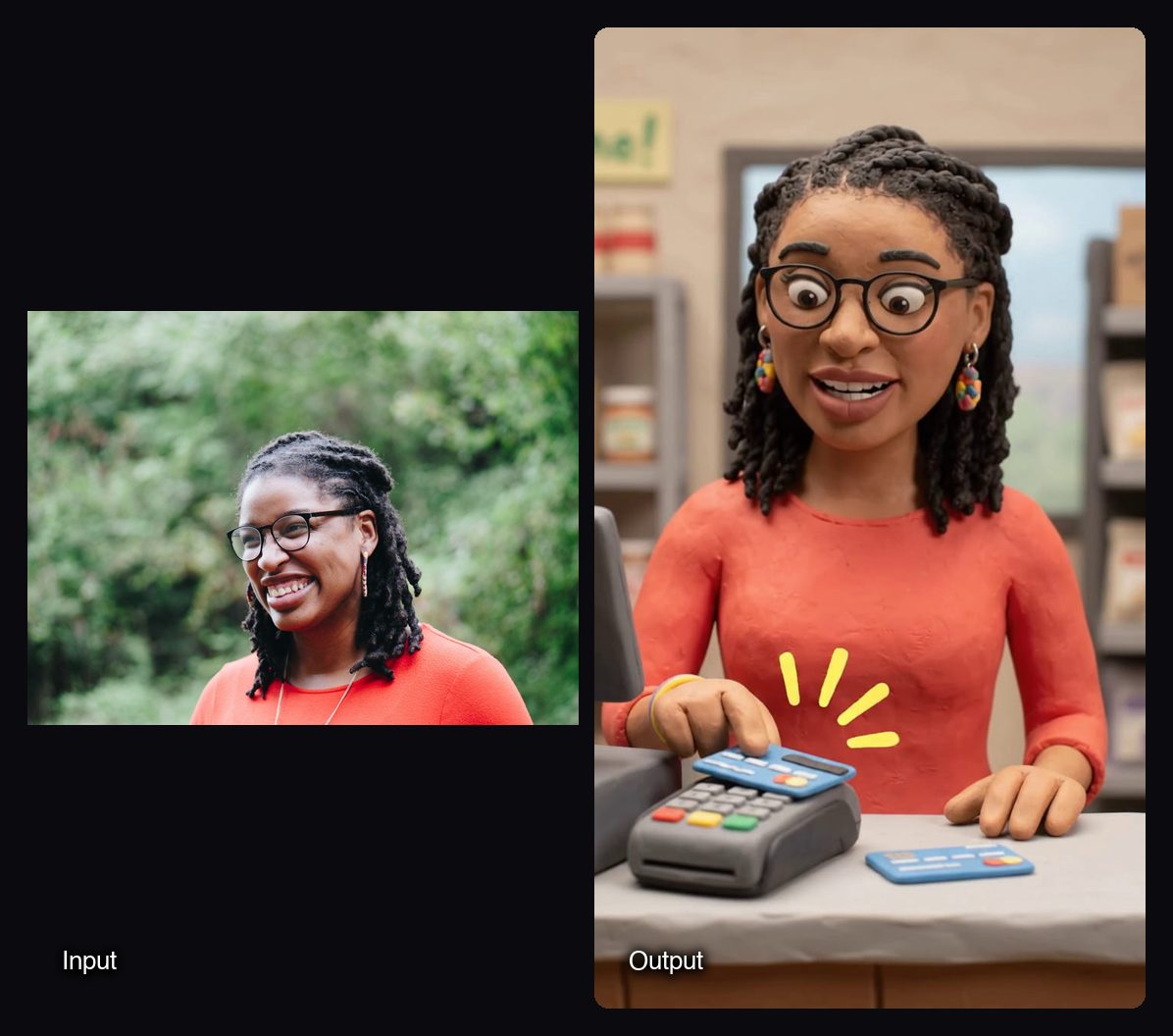
- AI Claymation and Wool Explainer Videos: one photo and a topic in, a 10-second 9:16 clay, wool or Pixar-style video with voice out, for 15.27 credits a run.
- Decades Time Machine: a 10-second vertical reel that morphs you through 2 to 5 decades, for 18.3 credits a run.
- Product Scene Transformation: keeps your product and its motion and changes the world around it, for 8.59 credits a run.

Watch out for: clips are 3 to 10 seconds per generation and only 16:9 or 9:16. Sound is always on and cannot be switched off. Sloosh's model table lists "chat to make and edit" as its strength, but Sloosh Studio uses the normal prompt box, not a chat thread. Sloosh has no public API yet, so developers who want code access should use the Gemini API.
How to try Gemini Omni 1.1 Flash in Sloosh
Trying the model in Sloosh takes five steps.
- Sign in at sloosh.ai. A first workspace gets 20 starter credits once; Sloosh has no free plan.
- Open Studio > Video and pick Gemini Omni 1.1 Flash in the model chip.
- Describe one continuous moment and move the camera inside it. Write timed beats such as
[0-2s]and[2-6s], and put the sound on its own Audio line. - Add references or frames. Product photos hold a product steady; with first and last frames, describe only the change between them.
- Draft at 360p, then press Generate at 1080p or 4K for the keeper. The button shows the credit cost first.
Frequently asked questions
Is Gemini Omni 1.1 Flash free?
No, not through the API. Google's pricing page lists the free tier for Gemini Omni 1.1 Flash as "Not available", and Flow access comes with Google AI Plus, Pro or Ultra. Sloosh has no free plan, but a first workspace gets 20 starter credits once.
How do you get access to Gemini Omni?
You get access through the paid Gemini API in Google AI Studio, through Vertex AI on Google Cloud, through Google Flow with a Google AI Plus, Pro or Ultra plan, or through a studio such as Sloosh or Higgsfield. Developers need a linked billing account; studio users need only that studio's account.
How long can a Gemini Omni 1.1 Flash video be?
A single Gemini Omni 1.1 Flash clip is up to 10 seconds. Google's API extends a clip in 10-second steps to 40 seconds in total, and Sloosh's Spacelab does the same with the Video edit node.
Does Gemini Omni 1.1 Flash make 4K video?
Yes. Google offers 4K output, produced by upscaling, alongside 360p, 720p and 1080p. Sloosh offers the same four resolutions on every plan.
Can I use Gemini Omni 1.1 Flash without a Google Cloud account?
Yes. Google Flow and the Gemini app need only a Google account with a Google AI plan, and Sloosh needs only a Sloosh account. The Gemini API needs a linked billing account for this model, and Vertex AI needs a Google Cloud project.
Bottom line
For developers, the Gemini API in Google AI Studio is the best access to Gemini Omni 1.1 Flash, with Vertex AI for Google Cloud teams. For Google AI subscribers, Flow is the simplest no-code route. If you want the model inside ready-made formats such as clay explainers and product scene swaps, or driven by an agent, Sloosh runs it in Studio, Spacelab and Spaces.
Try Gemini Omni 1.1 Flash in Sloosh Studio