What is the best AI room redesign tool?
What is the best AI room redesign tool?
Updated October 23, 2026 · By Tyler Bennett
The best AI room redesign tool depends on whether you want a new look or a new plan: ReimagineHome or HomeDesigns AI to restyle a room photo with shopping links for real products, Planner 5D to draw a floor plan and design it in 3D, RoomGPT for a quick restyle of one photo, and Sloosh for a set of redesign options, where its Room Service Space returns a contact sheet of concepts across the 4 to 12 directions you pick, keeping your walls and layout, for 3.36 credits a run (Sloosh, Oct 2026). All of them make visualisations, not building plans, so measure before you buy.
Quick picks by use case
- Redesign with products you can buy: ReimagineHome, which designs with real products for your space, taste and budget, or HomeDesigns AI, which lists shopping links.
- Planning a layout from scratch: Planner 5D, with 2D and 3D floor plans and a library of more than 8,000 items.
- One quick restyle of a photo: RoomGPT, or Sloosh Room Restyle for 2.01 credits.
- Several directions to compare: Sloosh Room Service, with a contact sheet across 4 to 12 directions you pick.
- Empty or declutter a room first: Sloosh Spring Clean, or ReimagineHome's Empty Your Space tool.
- See a specific sofa or lamp in your room: Sloosh Product in Room.
What makes a good AI room redesign?
A good AI room redesign changes the furniture and decor while keeping the architecture, so you can picture it in the real room. The checklist below works with any tool.
- A wide, clear photo. Shoot from a corner at chest height, with the walls, floor, windows and doors in frame, in daylight.
- Fixed architecture. Walls, windows, doors and the camera angle should not move. If they do, the design will not fit your room.
- A specific style. "Mid-century modern, walnut, mustard and green" beats "make it nice".
- A budget level. A refresh with new textiles is a different project from a full restyle.
- What to keep. Name the pieces you are not replacing, such as the bed or a rug.
- Real dimensions. AI images do not measure. Check every piece against a tape measure before you order.
 [room photo] + [style, budget, keep list]
        |
        v
 +-----------------------------+
 | AI redesign                 |
 | walls, windows, angle fixed |
 +-----------------------------+
        |
        +--> 1 restyled image
        +--> a contact sheet to compare
        |
        v
 [pick one] -> [measure] -> [buy or brief a designer]
An AI room redesign gives you options to choose from; the tape measure decides what you buy.
How we compared
We read each vendor's own home page on October 23, 2026 and recorded what it states about inputs, features, free use and price. We did not redesign the same room in every tool. Most vendor pages do not list prices, and the table says so.
AI room redesign tools compared
| Tool | Best for | What the vendor states | Free option | Price shown | Checked on |
|---|---|---|---|---|---|
| ReimagineHome | Redesign and staging with real products | Restyle, virtual staging, Empty Your Space, exteriors | First 5 designs free, no card | On pricing page | Oct 23, 2026 |
| HomeDesigns AI | Many styles, interiors to gardens | 80+ design styles, virtual staging, shopping links, API | 3 credits every 24 hours | Not shown | Oct 23, 2026 |
| RoomGPT | A quick restyle of one photo | Transform any room with one photo | Not stated | Not shown | Oct 23, 2026 |
| Planner 5D | Floor plans and 3D design | 2D to 3D plans, 4K renders, 8,000+ items, AI plan recognition | Get started free | Not shown | Oct 23, 2026 |
| Sloosh Room Service | Comparing 4 to 12 directions | Style, budget, light, keep list; walls and layout kept | 20 starter credits once | 3.36 credits a run | Oct 23, 2026 |
| Sloosh Room Restyle | One redesign from a typed style | One 16:9 image; architecture and camera angle kept | 20 starter credits once | 2.01 credits a run | Oct 23, 2026 |
ReimagineHome
ReimagineHome restyles furnished rooms with real, buyable products chosen for your space, taste and budget, and stages empty rooms while keeping walls, windows and ceiling lines fixed. It also covers exteriors, from hardscaping to adding a pool. Your first 5 designs are free, with no credit card (ReimagineHome, Oct 2026).
- Best for: homeowners who want to shop the result, and agents staging listings.
- Watch out for: prices are on a separate pricing page, not the home page.
HomeDesigns AI
HomeDesigns AI redesigns and furnishes interiors, exteriors and gardens, offers more than 80 design styles, stages empty rooms and lists shopping links for furniture and decor. It gives 3 new free credits every 24 hours (HomeDesigns AI, Oct 2026).
- Best for: trying many styles on the same room.
- Watch out for: the home page shows no plan prices.
RoomGPT
RoomGPT transforms a room from one photo, so you can see it in different themes before you renovate.
- Best for: a fast first look at a new style.
- Watch out for: the home page lists no prices or free tier, only a discount code.
Planner 5D
Planner 5D is home design software for drawing a floor plan and turning it into a 3D design, with 4K renders, more than 8,000 furnishing items and an AI tool that recognises floor plans. It runs on Windows, Android and iOS.
- Best for: planning a layout or a renovation, not just restyling a photo.
- Watch out for: it takes more time to learn than a photo-redesign tool.
Sloosh: room redesign Spaces
Sloosh is an AI video and image studio for creators, filmmakers and brand teams. Its home Spaces each take a room photo and a few choices.
- Room Service: pick a style (Warm minimal, Japandi, Mid-century, Chettinad, Boho, Industrial, Coastal or Surprise me), how far to go (Refresh, Restyle or Rethink), a budget (Thrifty, Mid or Splurge), the light and 4 to 12 directions such as Reading corner or Work-from-home. You get a contact sheet of concepts with walls and layout intact, for 3.36 credits.
- Room Restyle: type a style and get one 16:9 image with new furniture, textiles and decor, keeping walls, windows and camera angle, for 2.01 credits.
- Spring Clean: declutter, remove furniture or empty the room to a shell, for 1.74 credits.
- Product in Room: add a packshot of furniture or decor and it replaces the closest matching piece at the right scale, for 2.01 credits.
- Floor Play turns a floor plan into a PDF pack with a furnished top-down render and eye-level room views (8.77 credits), and Room Tour turns room photos into a 10-second walkthrough video (15.2 credits).
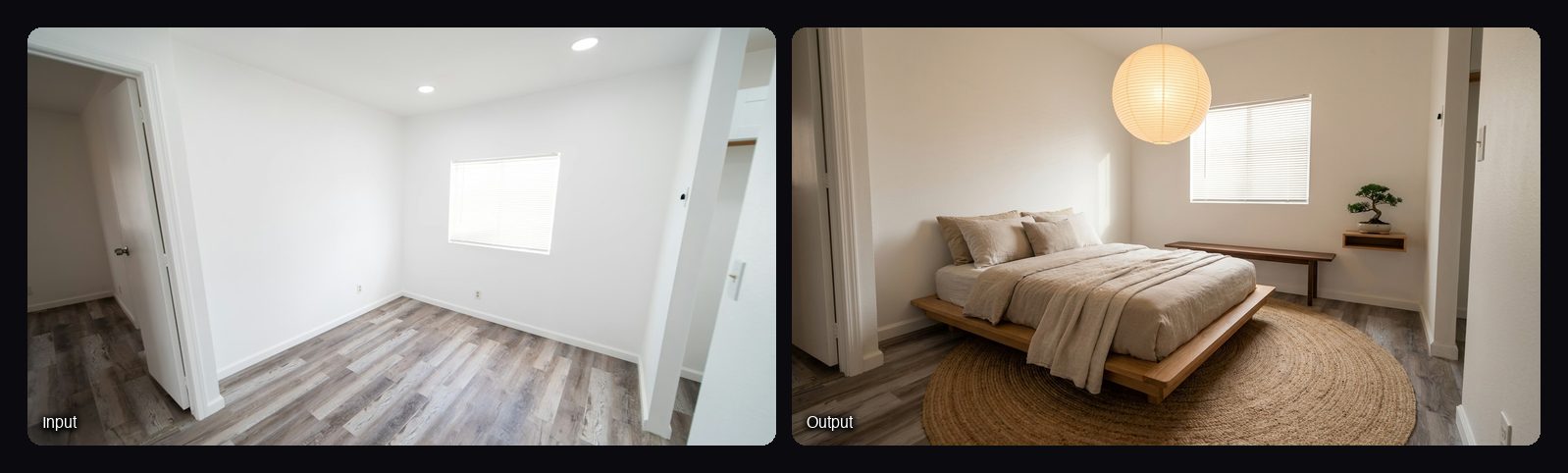
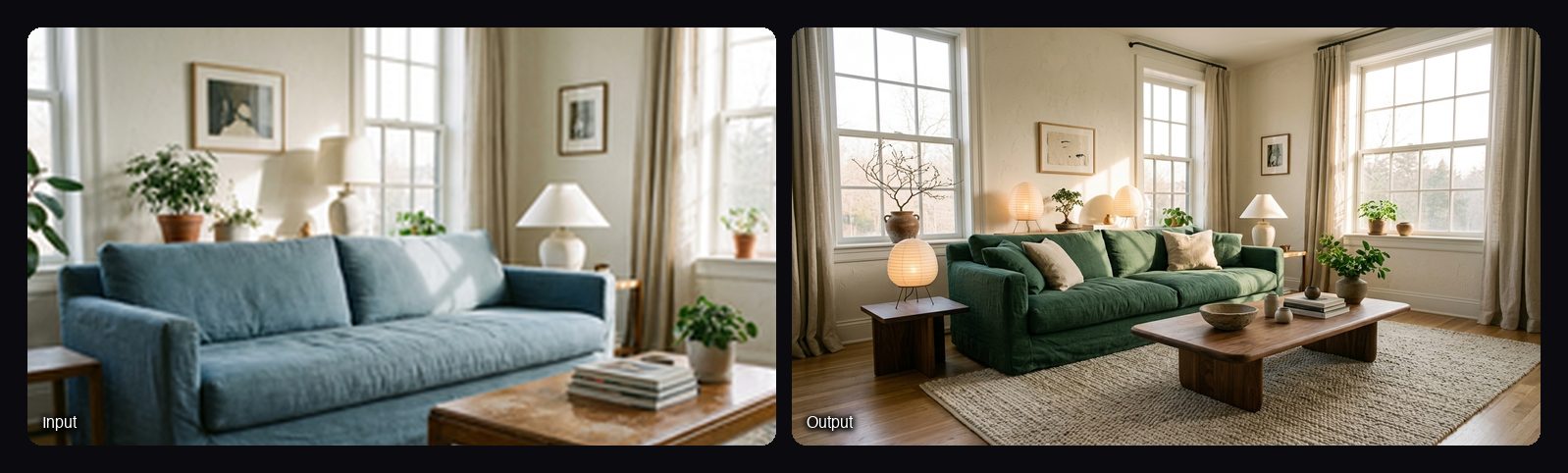
Watch out for: Sloosh's room Spaces make visualisations only, with no shopping links, measurements or floor-plan editing. There is no free plan; a new workspace gets 20 starter credits once.
How to redesign a room in Sloosh
- Take the photo. Shoot a clear, wide shot showing the walls, floor, windows and doors, in good light.
- Open Room Service. Go to sloosh.ai/spaces/room-service-2 and sign in.
- Set the brief. Pick a style, how far to go, a budget and the light, then choose 4 to 12 directions. List anything to keep, and add up to 3 style reference photos if you have them.
- Press Generate. The button shows the cost, 3.36 credits, before you spend anything.
- Pick a direction. Choose the concept you like, then run Room Restyle with that style for a single larger image, or Product in Room to test a specific piece.
Frequently asked questions
Is there a free AI tool that can redesign a room?
Yes, with limits. ReimagineHome gives your first 5 designs free, and HomeDesigns AI gives 3 free credits every 24 hours. Sloosh has no free plan but gives a new workspace 20 starter credits once, enough for several Room Restyle runs.
Can AI redesign a room from a photo?
Yes. Upload a clear photo, choose a style, and the tool replaces furniture and decor while keeping walls and windows. Sloosh's Room Restyle does this for 2.01 credits and returns one 16:9 image.
Will AI keep my room's layout?
Good tools do. Sloosh's Room Restyle, Room Service and Spring Clean keep walls, windows and layout, and ReimagineHome says its staging keeps walls, windows and ceiling lines fixed. Always compare the result with your photo.
Can I see a specific piece of furniture in my room?
Yes. Sloosh's Product in Room takes your room photo and a packshot, and places the product where the closest matching piece was, at the right scale and with matching light. ReimagineHome and HomeDesigns AI also link to products you can buy.
Is AI room design accurate enough to order furniture?
No. AI images show a style, not measurements. Measure the room and each piece before you order, or take the image to a designer as a brief.
Bottom line
To shop a new look, ReimagineHome and HomeDesigns AI link designs to real products. To plan a layout or renovation, Planner 5D works from a floor plan in 3D. To compare several directions for one room before you commit, Sloosh's Room Service gives a contact sheet of concepts across the directions you pick, for 3.36 credits.