How do I make UGC-style product-in-hand videos with AI?
How do I make UGC-style product-in-hand videos with AI?
Updated October 23, 2026 · By Megan Carter
To make a UGC-style product-in-hand video with AI, start from a sharp product photo and a photo of the person, generate a phone-shot style frame of them holding the product, then animate it into a short vertical clip. In Sloosh, the Product in Hand (UGC) Space makes that 9:16 still for 2.01 credits, and the UGC Unboxing Clip or UGC Selfie Video Ad Spaces turn the same inputs into 5 second or 4 to 15 second videos (Sloosh, Oct 2026). Dedicated UGC tools such as MakeUGC and Arcads also offer AI actors that hold your product.
The hard part is not the motion. It is making the shot look like a customer filmed it, with the label still readable.
What makes a product-in-hand video look like real UGC?
A product-in-hand video looks real when it looks unplanned: a phone camera, natural light, a real-looking hand and the product label facing the lens. This checklist works with any tool.
- Vertical and handheld. Shoot or generate 9:16, slightly off-centre, with a little natural camera movement.
- Everyday setting. A kitchen, a bathroom shelf, a car seat, a desk. Studio backdrops break the illusion.
- The label, early and sharp. Hold the product toward the camera in the first 1 to 2 seconds. Upload a photo where the label is flat and legible.
- A believable hand. Use a person photo with a hand visible, and check the fingers and grip in every frame.
- One action per clip. Hold up, turn, open, apply. Several actions in 5 seconds look rushed.
- A true claim. If someone speaks, the words must match real experience with the product.
How to make a product-in-hand video in Sloosh
Sloosh is an AI video and image studio for creators, filmmakers and brand teams. Its Spaces run a fixed workflow from a simple form. For product-in-hand content, use them in this order.
 [product photo] + [person photo]
            |
            v
  Product in Hand (UGC)  -> 9:16 still     2.01 cr
            |
     +------+---------------------+
     v                            v
 UGC Unboxing Clip         UGC Selfie Video Ad
 5 s, no speech            4-15 s + voiceover
 17.34 cr                  52.08 cr
Check the look on a cheap still first, then spend on video.
- Make the still. Open Product in Hand (UGC), upload a product photo and a clear, front-facing person photo with a hand visible, and press Generate. You get one vertical 9:16 photo of that person holding your product in a casual phone-shot style. The person's face and the product's label stay as in your photos.
- Check it. Look at the grip, the fingers and the label. At 2.01 credits a run, re-running until it looks right is cheap.
- Make a silent clip. UGC Unboxing Clip takes a product photo and a creator photo and returns one 5-second vertical 9:16 clip of that creator opening and showing your product, for 17.34 credits. It has no speech, so add music or a voiceover in your editor.
- Or make a talking ad. UGC Selfie Video Ad takes 1 to 8 product photos, one creator photo and a brief, writes a shot-by-shot script, and returns a 4 to 15 second selfie-style video with voiceover in 9:16, 1:1 or 16:9, for 52.08 credits.
- Or animate the still yourself. In Sloosh Studio's Video page, use the still as a start frame and describe the motion ("she turns the jar toward the camera"). Seedance 2.5 makes 4 to 30 second clips at up to 1080p, but in Sloosh a start frame cannot be combined with reference images.
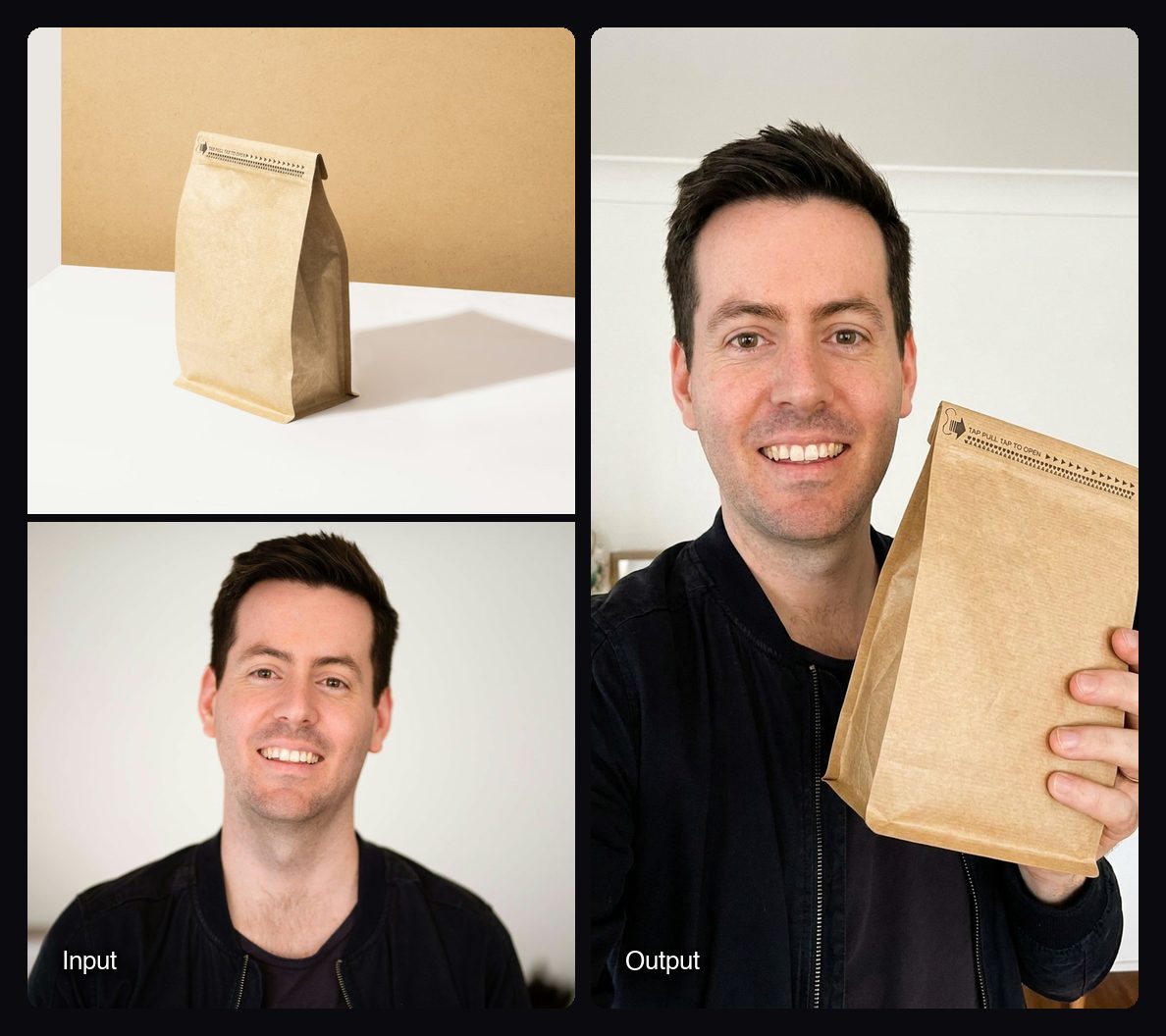
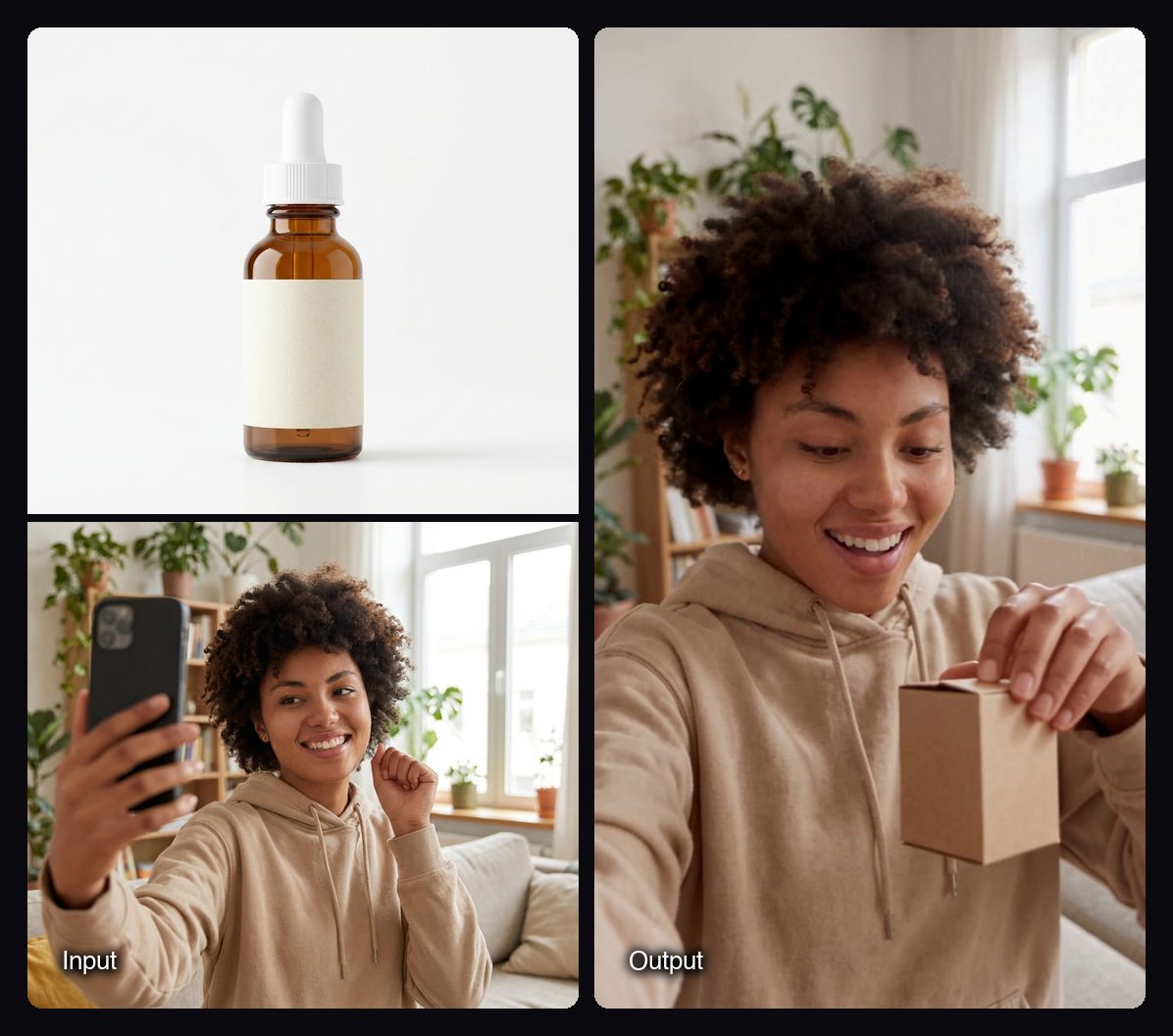
Watch out for: Product in Hand (UGC) makes a still image, not a video, so motion always costs a second step. The Unboxing Clip is fixed at 5 seconds with no speech, and Sloosh has no library of stock actors: you supply the person's photo and need their permission to use it.
Other ways to make product-in-hand videos
Dedicated UGC tools give you stock AI actors; general video tools give you more control over the shot. Facts are from each vendor's own site.
| Tool | Best for | How the product gets in hand | Checked on |
|---|---|---|---|
| Sloosh | Your own creator's face, still first, then video | Product in Hand still, then Unboxing Clip or Selfie Video Ad | Oct 23, 2026 |
| MakeUGC | Stock actors speaking 50+ languages | A Product in Hand feature: "add a product photo for the actor to hold" | Oct 23, 2026 |
| Arcads | Testing many actor faces | 1,000+ AI actors; "make them hold your product" | Oct 23, 2026 |
| Runway | Shot-level control with a general video model | Generate the shot with its Gen-4.5 video model and a prompt | Oct 23, 2026 |
| CapCut | Finishing the clip | Not a generator for this; adds automatic captions and edits | Oct 23, 2026 |
Check each vendor's pricing page before you commit.
Manual route. Film a 5-second vertical clip of yourself holding the product on your phone, then use AI only where it helps: swap the background, extend the clip, or add captions. Real footage of the real product is still the most convincing UGC.
Tips for better results
- Match lighting. A product photo shot in daylight blends better into a daylight hand shot.
- Crop the product photo tight. The less background in the upload, the less the model has to guess.
- Keep packaging simple in frame. Small print is where AI errors show first.
- Make several and pick one. Cheap stills let you choose the most natural grip before you pay for video.
Frequently asked questions
Can AI make a video of a person holding my product?
Yes. Tools like Sloosh, MakeUGC and Arcads generate a person holding your product from a product photo. In Sloosh, the UGC Unboxing Clip and UGC Selfie Video Ad Spaces both take a product photo and a creator photo and return a vertical video.
Is AI UGC allowed on TikTok and Instagram?
Yes, but platforms may require you to label realistic AI content, and the testimonial must be true. Sloosh's UGC ads guide notes that the FTC's rule on fake reviews and testimonials took effect on October 21, 2024, and that a false testimonial is not allowed even when the creator is AI.
Does the Product in Hand (UGC) Space make a video?
No. Product in Hand (UGC) returns one vertical 9:16 photo for 2.01 credits. Use UGC Unboxing Clip or UGC Selfie Video Ad for video, or use the still as a start frame in Sloosh Studio.
Whose photo can I use as the person holding the product?
Use your own photo or a creator who has given permission. Sloosh's Space pages say to upload only photos of products and people you have the rights to use.
How do I keep my product label readable?
Upload a sharp, flat-on product photo with the label facing the camera and little background. Then check every frame, since AI video models can blur or rewrite small text.
Bottom line
Make the product-in-hand still first, check the hand and the label, then turn it into video. Use MakeUGC or Arcads if you want stock actors, and Sloosh if you want your own creator's face with a cheap still step before you spend on video.
Make a product-in-hand image in Sloosh